Known issue: Unable to select sections in SpeedGrader
SpeedGrader will not allow instructors to select sections and will only display a small subset of the cohort.
Issue
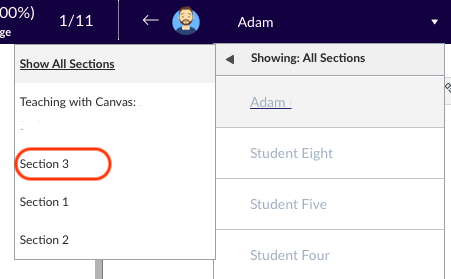
When using SpeedGrader, if Large Subject is enabled in settings where the default section has no enrolments, SpeedGrader will display a subset of students, regardless of the section filter settings. Often sections are created by integration and cannot be edited.
To verify which section is selected by default, click the dropdown filter next to the listed student in SpeedGrader. The default section is the first section listed after Show all sections, and the Section named after the Subject.
Status
The vendor is currently investigating the issue.
Workaround
This can be fixed by disabling Large Subjects in the Subject setting screen.
Support
Please submit a support request with Teaching and Learning Innovation with any questions or concerns.
More Information
Teaching and Learning Innovation