Turnitin: Accessing and interpreting the AI Writing Report
Artificial intelligence report for Turnitin
In using this guide, please refer to the University’s position on AI tool use in assessment, and information that is provided to students pertaining to AI use at the University.
Accessing the AI Writing Report
Accessing the AI Writing Report depends on the Turnitin integration selected.
Canvas Plagiarism Framework

Access the similarity score from either the Canvas Gradebook, or SpeedGrader. Then click the AI Writing Score in Turnitin Feedback Studio.
Canvas Document Processor
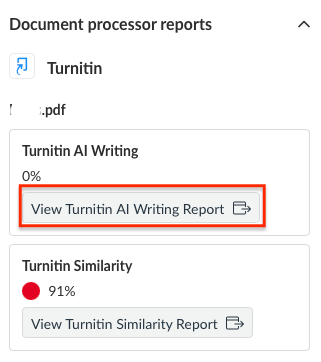
Access the AI Writing Report from within SpeedGrader by clicking the View Turnitin AI Writing Report button.
Turnitin LTI 1.3

Access the AI Writing Report by clicking the percentage indicator in the AI Writing column.
Understanding the AI Writing Report
The AI Writing Report will load the student’s submission, and will highlight any text that the tool’s algorithms have marked as likely AI generated.
If the AI Writing Score is displaying an asterisk (*%), this indicates that the AI detection score was below the 20% threshold for the submission, and no text will be highlighted within the report. This change was implemented on July 8, 2024 to avoid false positives, where text is incorrectly flagged as AI-generated.
Different colours are used to differentiate whether the section is likely to have used AI writing or AI paraphrasing.
- AI Writing is where the text is marked as likely coming from a large-lanugage model (LLM), e.g. someone has prompted an LLM such as ChatGPT for a written response to a question.
- AI paraphrasing in the context of the Turnitin Tool is where the system has marked a passage of text as likely AI generated text that is additionally revised through a paraphrasing tool, e.g. someone has prompted an LLM for a written reponse to a question, and then subsequently submitted that text to another tool such as QuillBot to rewrite or paraphrase the text.
There will be an additional Submission Breakdown that appears to the right of the report, which will show the detailed breakdown of the identified AI writing percentage.

This report can be downloaded through the downward arrow button in the top right corner. The downloaded report includes a cover sheet, the student’s AI writing score alongside Frequently Asked Questions to help the viewer understand the report, and the student’s highlighted essay.
However, student submissions that do not meet the below file requirements cannot be successfully processed for AI writing detection and Turnitin will display a message that says, “AI writing detection unavailable.”
- File size must be less than 100MB
- File must have at least 300 words of prose text in a long-form writing format
- File must not exceed 15,000 words
- File must be written in English
- File type must be .docx, .pdf, .txt, .rtf

Much like the Similarity Score, the AI Writing Scoredoes NOT indicate whether the student has engaged in academic misconduct. Staff should review the Turnitin FAQs, Resources, and Guides linked below the AI Writing Score to understand the limitations of the Turnitin AI detection tool before reviewing these scores.

More information on the Similarity Report can be found in the Turnitin vendor guide.
Please submit a support request with Teaching and Learning Innovation with any questions or concerns.
This guide was last updated 19 Mar 2026.
Submit an LMS support request for further assistance or to report any errors or omissions in this guide.