Stackle
Stackle is an online journaling tool that allows teaching staff to create reflective writing tasks that students complete within their LMS subjects.

What is Stackle?
Stackle is an online journalling tool integrated into the LMS that enables reflective writing and journaling. Teaching staff can create one-off tasks or series of tasks, using text, images or other media to prompt asynchronous reflections from students.
Teaching and learning applications
Staff must be aware of compliance rules and guidance around privacy and the collection of data from students via surveys used in subjects. Please refer to this guidance.
Stackle is well-suited to formative or scaffolding activities that require students to reflect on their learning in a subject or during a placement.
Students can demonstrate their learning and share their progress with instructors in the subject, while instructors can monitor students' progress and engagement.
Access and licensing
Getting started
Navigate to Modules in your LMS subject and create a new Canvas Page; using the Apps button in the rich content editor, choose Stackle from the drop-down list.
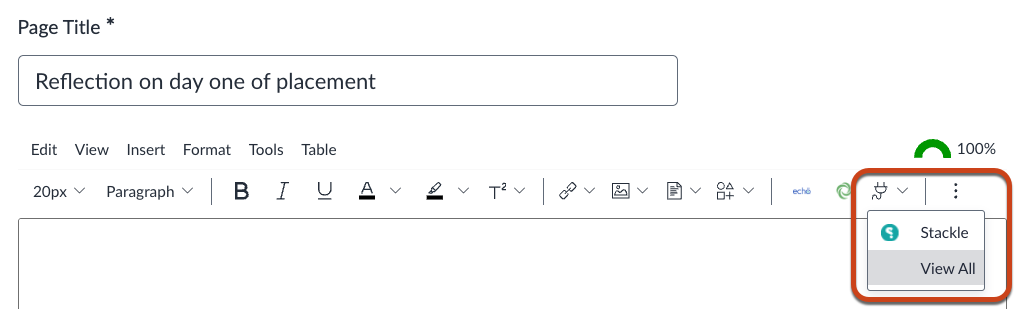
You will be prompted to connect your subject to Stackle by creating a new Stackle subject or linking to pre-existing Stackle assets. Once you’ve connected to Stackle, you can begin creating activities and embedding them in the LMS.
Ungraded Stackle activities can be directly embedded in LMS pages or linked in LMS Modules.
Stackle can also be used in Canvas Assignments for activities where students receive feedback from instructors on their work.
Stackle is licensed for use at the University of Melbourne.
Support and resources
Stackle is supported by Teaching and Learning Innovation. Please submit a support request for assistance.